
 By
By 
Product images are often the first thing customers notice when shopping online. However, e-commerce sellers usually need more than a single product photo. They may also need promotional banners, social media graphics, and branded visuals to support different sales campaigns.
Creating these assets manually can take time, especially for small businesses and independent sellers without dedicated design teams. Recraft on Pollo AI offers a way to create design-focused images and commercial graphics through AI, helping sellers turn product ideas into usable marketing visuals more efficiently.
Why E-Commerce Sellers Need AI Tools for Faster Product Design
Creating product visuals often involves photography, editing, layout design, and branding decisions. While larger companies may have designers handling these tasks, smaller sellers often need to create content quickly while managing limited resources.
AI design tools can reduce the time spent on repetitive design work. Instead of starting every graphic from scratch, sellers can describe their ideas, generate different concepts, and adjust designs based on their product style and marketing needs.
For example, an online store may need different visuals for product pages, advertisements, email campaigns, and social media. Using AI can make it easier to create variations while keeping the overall look consistent.
This is where Recraft on Pollo AI can be useful. By combining AI image generation with design features, it allows sellers to create commercial visuals without requiring advanced design skills.
What Is Recraft on Pollo AI and Why Choose It for Product Graphics?
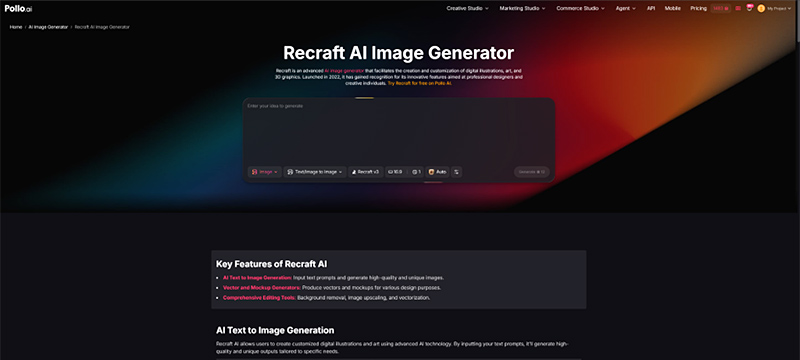
Recraft is an AI design tool focused on creating images, illustrations, vector graphics, and other visual assets. It is designed for users who need greater control over design style and consistency, making it suitable for product graphics, branding materials, and marketing content.
Recraft on Pollo AI allows users to access Recraft’s design capabilities within the Pollo AI platform. This means users can use Recraft’s image generation features while also exploring other AI creation tools available in the Pollo AI ecosystem.
For e-commerce sellers, Recraft can support different stages of the design process, including creating product images, promotional graphics, and branded visuals. Features such as image generation, vector creation, editing, background removal, and upscaling make it useful for both creating new designs and improving existing assets.
Compared with using Recraft as a standalone tool, Pollo AI provides a broader content creation environment. Many sellers and marketers need more than static images — they may also create ads, videos, and social media content for their campaigns.
By bringing multiple AI tools together, Pollo AI offers a more convenient option for small businesses, independent sellers, marketing teams, and content creators who need different types of visual assets without managing several separate platforms.
How to Create E-Commerce Product Graphics with Recraft on Pollo AI
A good product graphic needs to do more than look attractive. It should highlight the product, match the brand style, and fit the platform where it will be published. Recraft on Pollo AI can help sellers create different types of visuals, but the quality of the result depends on how the design process is planned. Combined with the Pollo AI image generator, it also gives users more flexibility to explore different visual styles and create product assets for various e-commerce needs.
Step 1. Choose the Right Product Visual Style
Before generating an image, sellers should decide what type of graphic they need. A product listing image usually focuses on clear product presentation, while an advertisement or social media post may require a more creative composition.
For example, a skincare brand may choose a clean background and soft lighting to create a premium look, while a clothing store may prefer lifestyle scenes that show the product in use.
Defining the purpose of the image first helps create more accurate results and avoids generating visuals that look appealing but do not support the sales goal.
Step 2. Write a Detailed Prompt Based on the Product and Brand Style
The prompt plays an important role in the final result. Instead of only describing the product, sellers should include information about the desired style, setting, and target audience.
For example, a coffee brand could describe its packaging, a warm café environment, natural lighting, and a modern lifestyle aesthetic. Adding details such as preferred colors or brand mood can also help create visuals that better match existing marketing materials.
Step 3. Generate Different Versions and Refine the Best Result
The first generated image is usually a starting point. E-commerce sellers often need several versions to find the design that works best for different platforms.
A marketplace listing may require a simple product-focused image, while a social media campaign may need a more eye-catching layout. By testing different prompts and adjusting visual details, sellers can explore multiple options without creating each design manually.
Recraft on Pollo AI also supports editing workflows, allowing users to refine images based on changing product or campaign requirements.
Step 4. Adapt Graphics for Different E-Commerce Channels
A product graphic should match the platform where it will be used. Marketplace images usually need to highlight product details clearly, while advertisements and social media graphics may focus more on storytelling and visual appeal.
After creating the main design, sellers can adapt it for product pages, promotional campaigns, email marketing, and social media. This helps maintain a consistent brand style across different channels.
Conclusion
Creating e-commerce graphics requires both visual quality and consistency. Recraft on Pollo AI helps sellers generate product images, promotional visuals, and branded assets through a simpler AI-based design process.
By combining Recraft’s design capabilities with Pollo AI’s wider creative ecosystem, businesses and creators can produce different types of marketing visuals more efficiently. With clear prompts and specific goals, AI-generated graphics can become a useful part of an e-commerce content workflow.
The post How to Create Eye-Catching E-Commerce Product Graphics with Recraft on Pollo AI appeared first on IoT Business News.